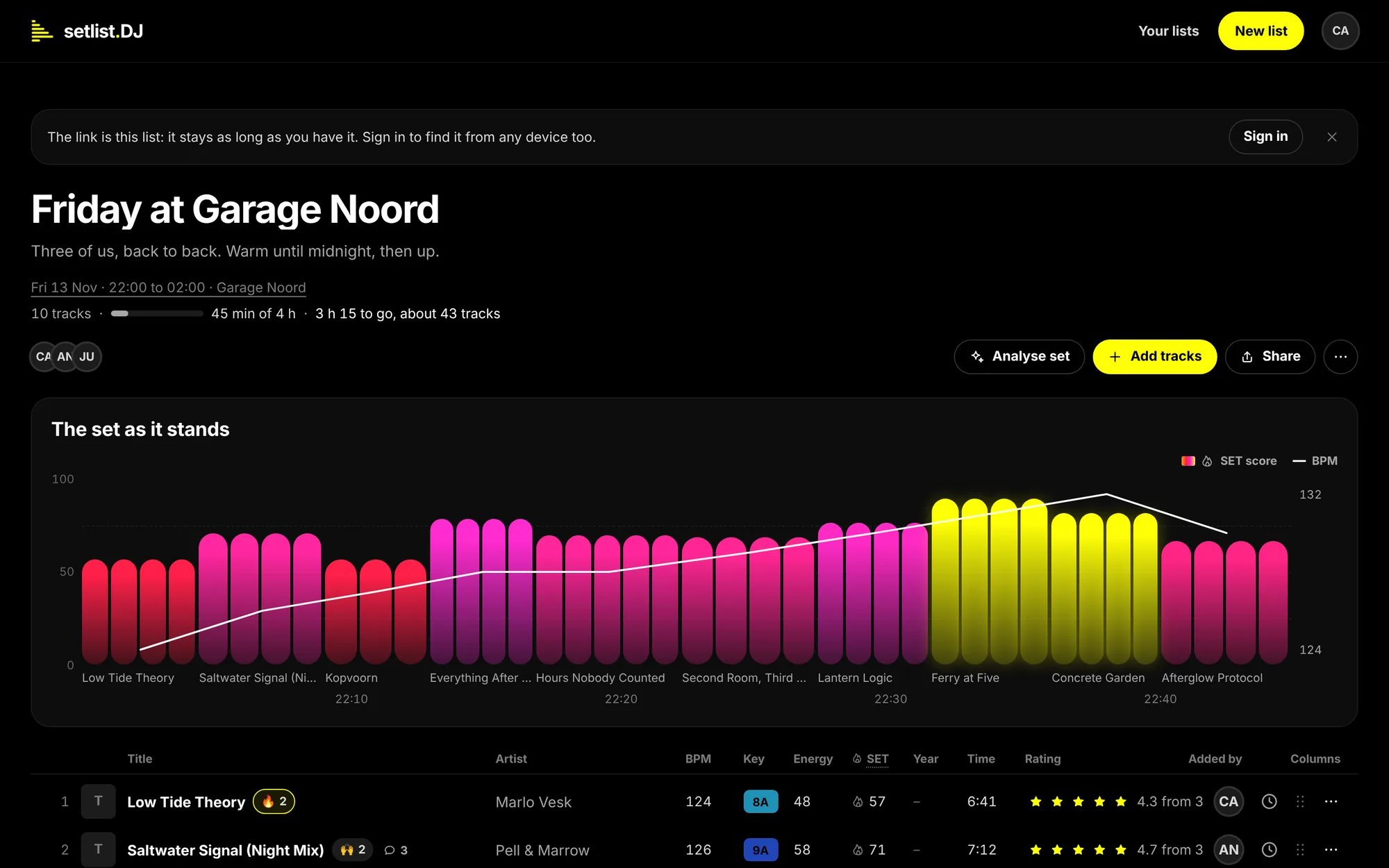
A list three DJs are working on: the title and a line about the set, the date, times and venue, how much of the set the tracks fill, the build-up of the set, then the tracks.
Who it is for
- A solo DJ who wants to shape a set before the night: see how long it runs, where the energy goes and whether the keys mix.
- Two or three DJs playing back to back who need to agree on one list, without a long chat thread.
- A collective that plans a night together: everyone adds, rates and comments, and the person who made the list decides who may do what.
What you can do
- Bring the tracks in from Spotify, YouTube, SoundCloud, Beatport or rekordbox, or type them by hand. See Add tracks.
- Read the set at a glance. setlist.DJ finds the BPM, key and energy of the tracks it knows (they are estimates), gives every track a SET score for how hot it makes the room, and draws the set’s build-up. See Read the list.
- Put it in order by dragging the tracks, or let Analyse set propose an order by tempo, key and energy. It works by fixed rules, and you decide whether to use the order. See Order the set.
- Listen to a track without leaving the list. See Play tracks.
- Decide together with stars, reactions and comments on every track, and a Maybe list for the ones on the fence. See Share and collaborate.
- Take it to the booth as a rekordbox file, a playlist file, a spreadsheet or plain text. See Take it to the booth.
What you need
How a list works
The link is the list. Every list has its own web address, and that address is the only way in. Send it to the other DJs and they open the same list. Anyone who has the link can open the list; there is no private list at the moment, so send the link only to the people you want on it. As the person who made the list, you choose in Share whether the link lets people edit, comment or only look. See Share and collaborate. You start as a guest. The first time you open setlist.DJ, it makes a list for you, and you are a guest in this browser. The first time you change something on a list, setlist.DJ asks for your DJ name (Who’s this?), so the others can see who added, rated and said what. Everyone who opens your link joins the same way. Signing in keeps your lists. As a guest, it is this browser that ties your lists to you. Sign in with your e-mail address (a link in your mail, no password) or with Google, and your lists, stars and comments come with you to every device. See Your first list and Account and privacy.The link keeps a list for as long as you have it, signed in or not. Signing in adds a way back: Your lists
shows every list you are on, wherever you open the site.
Where to go next
Your first list
Make a list, name it, add tracks and send the link.
Add tracks
From Spotify, YouTube, SoundCloud, rekordbox or by hand.
Read the list
The columns, the SET score and the build-up of the set.
Order the set
Drag the tracks, or let Analyse set propose an order.
Play tracks
Listen to a track without leaving the list.
Share and collaborate
The link, who may do what, stars, reactions and comments.
Take it to the booth
Export the list for rekordbox and other DJ apps.
Account and privacy
Guests, signing in, and what setlist.DJ keeps.
Troubleshooting
The usual problems and how to fix them.